
Every second counts when a security threat hits your network. Automated endpoint security alerts detect and notify your team of dangers in real time, eliminating the delays that turn minor incidents into costly breaches.
For small business owners, speed matters. Manual monitoring can’t match the pace of modern threats, but the right automated tools can shrink your response time from hours to minutes.
Why Endpoint Security Alerts Matter
Threats move faster than your IT team can react. A ransomware attack spreads across your network in minutes, yet many small businesses still rely on manual monitoring where security staff manually check logs and alerts throughout the day. This approach creates dangerous gaps. Attackers exploit the time between when a threat enters your environment and when someone notices it. The difference between a contained incident and a business-shuttering attack often comes down to hours or even minutes of response time. Automated endpoint security alerts eliminate this delay entirely. They detect suspicious activity the moment it occurs and notify your team instantly, removing the human lag that attackers depend on. Without automation, your security posture depends on someone being available at exactly the right moment, which is neither realistic nor scalable for small businesses operating with limited security staff.
Detection speed directly impacts your bottom line
A breach that takes weeks to detect costs dramatically more than one caught within hours. The average cost of a data breach in 2024 reflects this reality, with detection speed directly influencing the final bill. When you catch an intrusion within the first day, containment costs stay manageable and damage remains limited. When detection stretches to weeks or months, attackers establish persistence, move laterally across systems, and exfiltrate sensitive data before anyone notices. Automated alerts cut detection time from days to minutes, which translates directly to lower remediation costs and reduced business disruption. Small businesses cannot absorb the financial impact of extended breach dwell times. Your competitors who deploy automated detection gain a decisive advantage in both cost and operational continuity.
Round-the-clock protection without staffing costs
Automated alerts provide round-the-clock protection without requiring your team to work night shifts or maintain expensive security operations. Your endpoints generate security events constantly, but manual review means threats that emerge at 2 AM go undetected until business hours resume. Automated systems monitor every endpoint simultaneously and respond according to predefined rules, executing immediate containment actions like isolating compromised devices or blocking malicious domains before human intervention becomes necessary. This capability levels the playing field for small businesses that cannot afford dedicated 24/7 security staff. Your systems stay protected during nights, weekends, and holidays with no additional payroll expense. Automation handles routine threat detection and triage, freeing your existing IT team to focus on strategic security improvements rather than exhausting themselves with constant manual alert review.
What happens when you implement automated detection
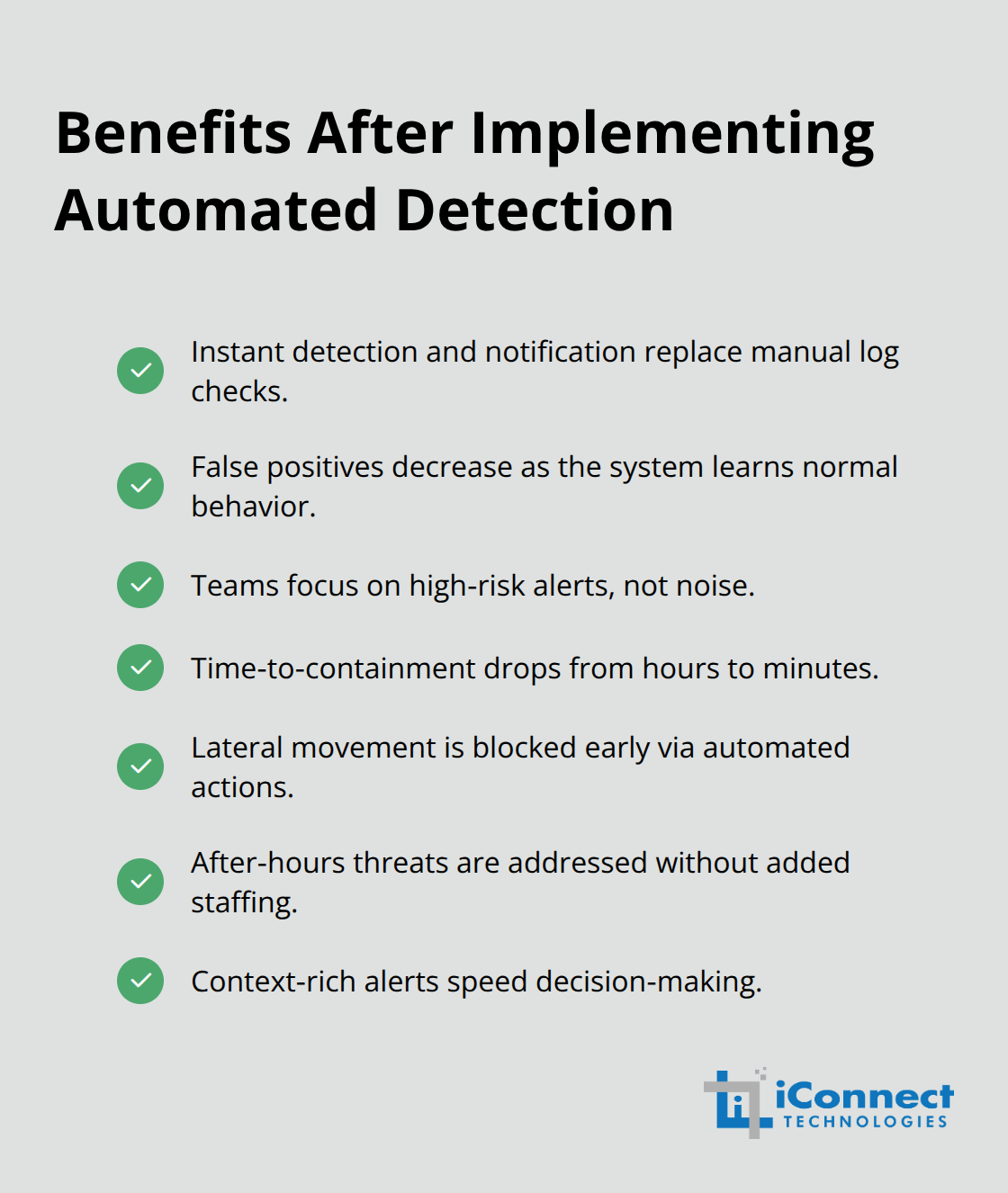
The shift to automated alerts transforms how your organization responds to threats. Your team no longer waits for someone to spot a problem-the system detects it and notifies the right people instantly. This shift means your IT staff can respond to genuine threats instead of wasting time on false alarms or manual log reviews. Automated systems also learn your environment’s normal behavior, which reduces false positives and ensures your team focuses on alerts that matter.
The next section explores exactly how automated alerts reduce your reaction time and what mechanisms make this speed possible.
How Automated Alerts Actually Cut Your Response Time
Automated endpoint security alerts operate through three core mechanisms that compress your response timeline from hours into minutes. Your security tools collect data continuously from every endpoint, analyze behavior patterns, and compare activity against known threat signatures and behavioral baselines. When suspicious activity triggers a detection rule, the system immediately notifies your security team with contextual information about severity, affected assets, and recommended actions.
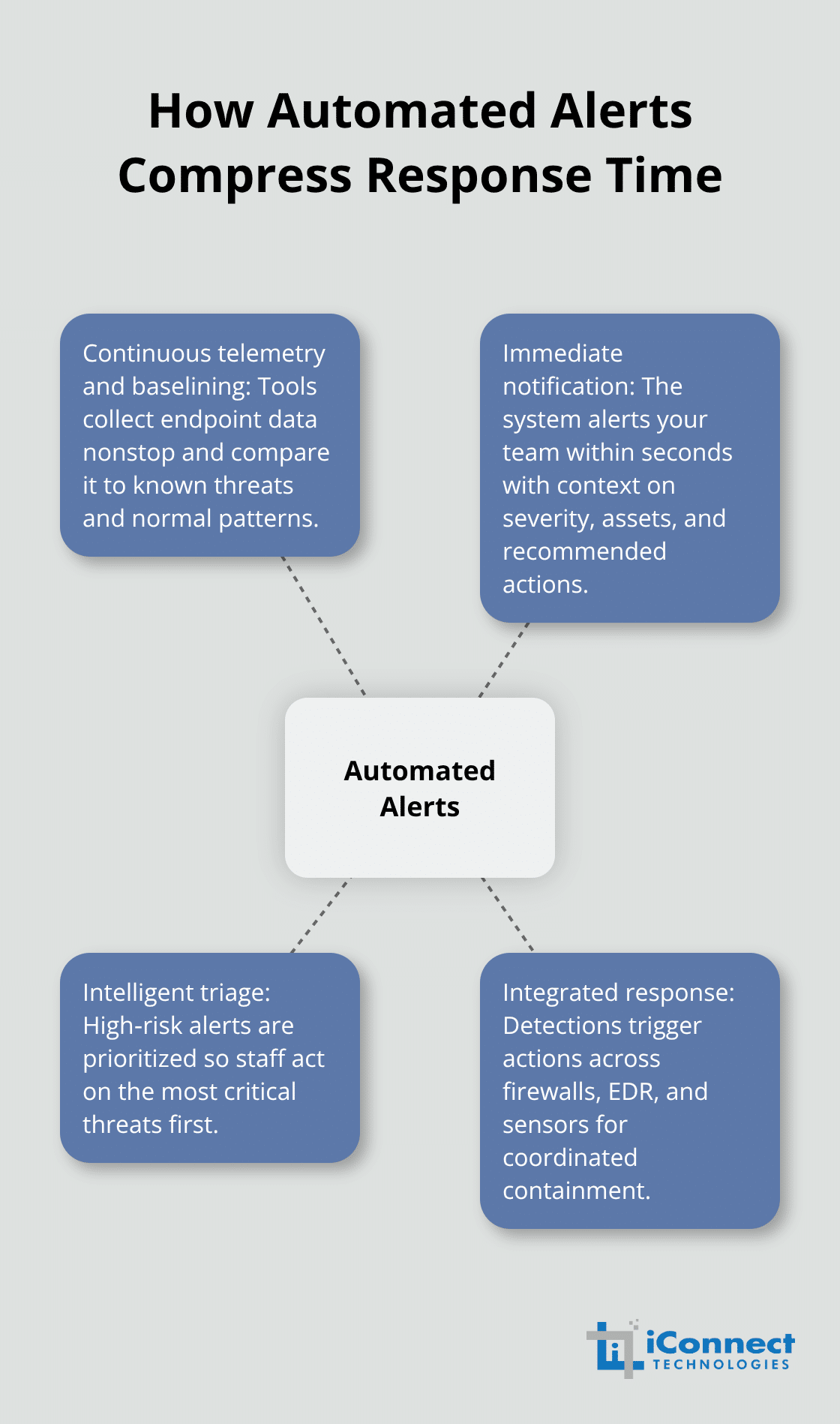
This notification reaches your team within seconds of detection, not hours later when someone manually reviews logs. Automated systems then perform intelligent triage by scoring alerts based on business impact and threat severity. Instead of your team wading through hundreds of low-priority alerts to find the critical ones, the system surfaces only high-risk threats that demand immediate attention. Finally, automated platforms integrate directly with your existing security stack-firewalls, endpoint detection and response tools, and network sensors-creating a coordinated response where detection in one tool triggers actions across your entire infrastructure.
Real-Time Detection and Immediate Notification
Your endpoints generate security events constantly throughout the day and night. Manual review means threats that emerge at 2 AM go undetected until business hours resume, but automated systems monitor every endpoint simultaneously and respond according to predefined rules. The system detects suspicious activity the moment it occurs and notifies your team instantly, removing the human lag that attackers depend on. A single malicious domain detected on one endpoint can be automatically blocked across your network within seconds, preventing lateral movement before it starts. This speed transforms your organization’s ability to contain threats before they spread.
Intelligent Triage Reduces Alert Fatigue
Alert fatigue destroys security effectiveness. Your team cannot focus on genuine threats when buried under thousands of false positives each day. Automated systems learn what normal looks like in your environment-typical file access patterns, standard software execution, expected network traffic-and alert only when genuine anomalies occur. The system scores each alert based on business impact and threat severity, ensuring your team focuses exclusively on threats that pose real risk to your operations. When phishing emails deliver malware, automated URL and domain analysis blocks the threat before users click, and behavioral analytics flag the unusual activity pattern for your security team.
Integration Across Your Security Stack
Automated platforms connect directly with your existing tools, creating coordinated responses across your entire infrastructure. When ransomware infection triggers on a single workstation, automated isolation removes that device from your network immediately, preventing the attack from spreading to file servers or backup systems. This integration means your security tools work together rather than in isolation, amplifying your detection and response capabilities without requiring new infrastructure investments.
Measurable Impact on Response Metrics
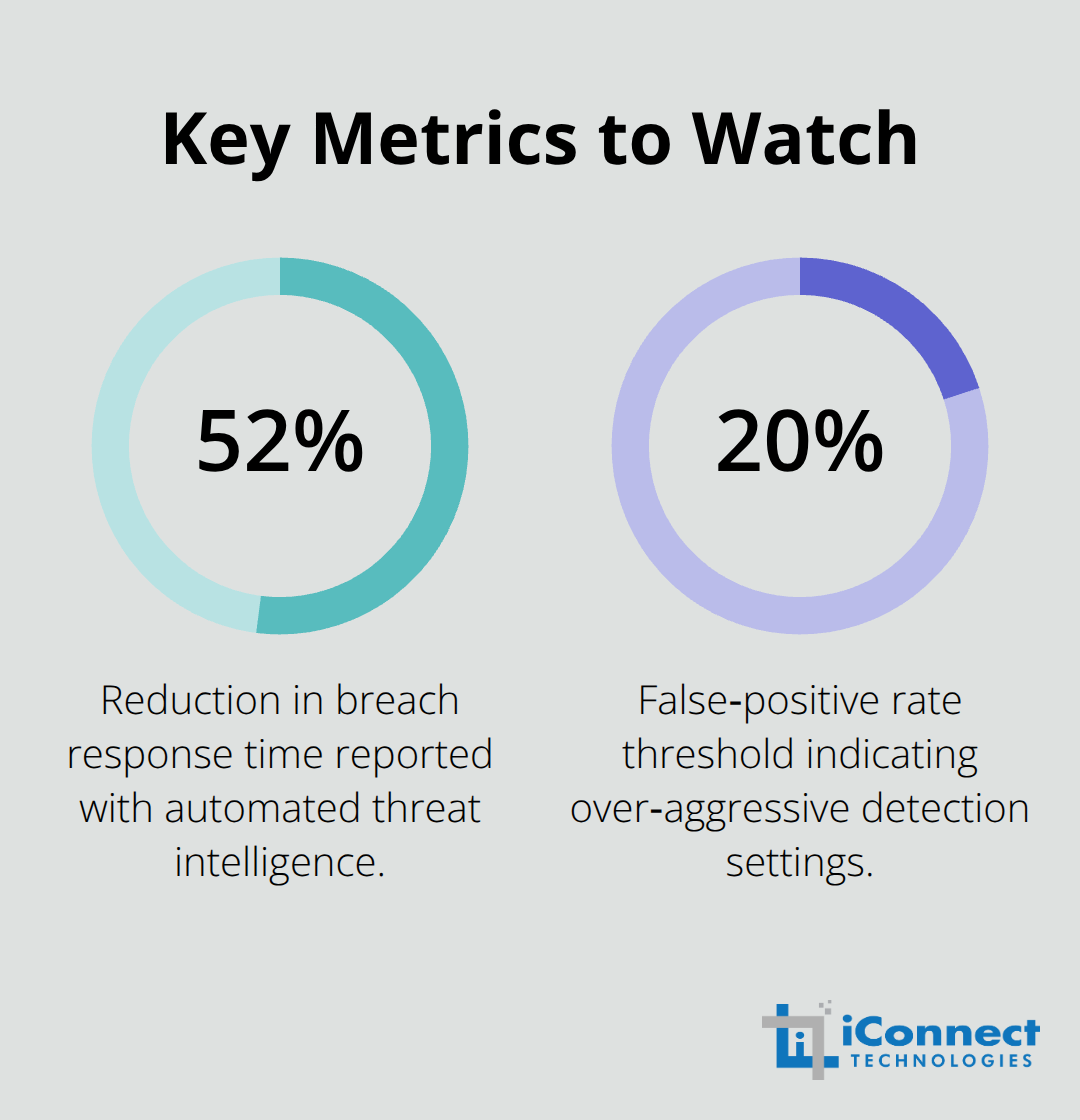
Organizations deploying automated threat intelligence report reducing breach response time by approximately 52 percent compared to manual methods. Your team moves from a reactive posture of discovering threats days after compromise to a proactive stance of containing threats within minutes of detection. Small businesses with lean IT staff cannot afford to waste time on noise, and automated systems ensure your team focuses exclusively on threats that matter. The next section explores the specific best practices that help you implement these automated capabilities effectively in your own environment.
Best Practices for Implementing Automated Endpoint Security
Deploying automated endpoint security alerts without proper configuration is like installing a fire alarm system and never testing it. Your tools will generate noise instead of actionable intelligence, your team will ignore alerts out of frustration, and threats will slip through the chaos. The difference between automated security that protects your business and automated security that wastes your time comes down to three critical decisions you must make before deployment. First, you need to establish alert thresholds and detection rules that match your specific environment rather than accepting default settings designed for generic enterprises. Second, your team needs structured training on how to respond when alerts fire, including clear escalation paths and decision criteria. Third, you must commit to ongoing tuning based on real performance data, not set it once and forget it. Small businesses often skip this work because it feels tedious compared to the exciting prospect of 24/7 automated detection. That mistake turns your security investment into an expensive source of frustration.
Calibrate detection rules to your actual environment
Default alert thresholds fail small businesses because they reflect what large enterprises need, not what you need. A Fortune 500 company with thousands of endpoints can tolerate more false positives because they have dedicated security analysts to filter noise. You cannot. If your automated system generates fifty alerts daily and only three are genuine threats, your team will stop reading them within a week. Start by documenting your normal baseline before you enable automated detection. What does typical file access look like on your critical servers? How many failed login attempts occur during a normal week? What network traffic patterns are standard for your operations? This baseline becomes your reference point for tuning detection rules. Many security teams make the critical error of enabling every detection rule their platform offers. Instead, start with a smaller set of high-confidence rules focused on the threats most likely to damage your business. Ransomware detection rules should trigger aggressively because a single infection can shut you down. Phishing detection should flag unusual email forwarding rules or suspicious URL patterns because your users click malicious links constantly. Insider threat detection based on abnormal data access patterns makes sense if you handle sensitive customer information. Less critical rules can remain disabled until your team gains confidence interpreting alerts. After two weeks of operation, measure your alert volume and false positive rate. If you receive more than ten alerts daily that turn out to be harmless, your thresholds are too sensitive-increase them. If you miss detections that manual review later identifies as genuine threats, your thresholds are too loose-decrease them. This calibration process takes time but prevents alert fatigue from destroying your security program.
Train your team on response procedures before alerts arrive
Automated alerts mean nothing if your team does not know what to do when one fires. Create a one-page response guide for each major alert type your system generates. When a ransomware alert triggers, your guide should specify exactly which person gets notified first, whether they should isolate the affected device immediately or investigate first, and who has authority to execute isolation commands. When a phishing alert fires, your guide should clarify whether your email gateway blocks the message automatically or requires manual review, and which user should receive notification about the suspicious email. Assign clear ownership for each response scenario rather than assuming whoever is available will handle it. This prevents critical delays caused by confusion about who is responsible. Conduct a single tabletop exercise quarterly where you walk through alert scenarios without actually executing containment actions. Spend thirty minutes discussing how your team would respond to a detected command-and-control connection on a workstation, or how you would handle an alert for mass file encryption on your file server. These discussions surface gaps in your procedures before a real threat arrives. Small businesses often skip this step because it feels like wasted time when nothing is actually wrong. The businesses that conduct these exercises respond to real incidents faster than those that do not because everyone knows their role before pressure hits.
Measure alert performance quarterly and adjust relentlessly
Set a calendar reminder to review your alert metrics every ninety days. Examine how many alerts your system generated, how many turned out to be genuine threats, and whether your team detected any threats that your alerts missed. If your false positive rate exceeds 20 percent, your thresholds are too aggressive and you need to tighten them.
If your team spends more than two hours weekly investigating alerts that turn out to be harmless, something is misconfigured. Do not accept this as normal. Contact your security tool vendor with specific examples of false positives and ask for tuning recommendations. Most vendors have seen your exact scenario hundreds of times and can suggest rule modifications that eliminate noise. Track which alert types consistently prove valuable and which ones your team ignores. If intrusion detection alerts have never led to confirmed threats but phishing alerts consistently catch real attacks, invest more in phishing detection and consider disabling intrusion detection temporarily. Your security budget is limited, so allocate it toward detections that work in your environment rather than spreading effort across everything your platform offers.
Final Thoughts
Automated endpoint security alerts have become essential for small businesses operating in today’s threat landscape. The speed advantage they provide determines whether your organization contains an incident or suffers catastrophic damage. Organizations that deploy automated detection reduce their breach response time by roughly half compared to those relying on manual methods, translating directly to lower remediation costs and minimal business disruption.
Every hour an attacker remains undetected multiplies your potential losses through lateral movement, data exfiltration, and system compromise. Automated endpoint security alerts compress detection from days into minutes, which means your containment costs stay manageable and your recovery timeline shortens dramatically. For small businesses operating with tight margins, this speed advantage often determines survival versus failure when a serious breach occurs. Proper configuration, team training, and quarterly performance reviews separate effective security programs from expensive noise generators.
Your security posture should not depend on luck or the availability of staff at exactly the right moment. Partner with security experts who understand your specific environment and can help you deploy automated detection that actually works for your business. The right implementation transforms your endpoint security into a reliable protection mechanism that operates continuously, regardless of time or staffing constraints.